Not too shure where it’s been coming from, but thanks everyone who’s been visiting the site. One person whom I do know has been reading my blog regularly is Mr Tan Kar Wee (Google him, you know you want to, current and future employers), who recently revealed to me his voyeuristic inclinations by way of an SMS-ed belated birthday greeting. I suspect he didn’t want to be just another statistic. LOL!
Anyway, he says he’s been using Google Reader to read my links. At last count, there were three subscribers to my feed – so I’m guessing the other two subscribers are Dr Ashley Tan and Mr Andrew Chong. Right?
Kar Wee was also asking where I get my links from and how I post them up. It’s also related to Google Reader – this post should explain everything. Google Reader rocks, but my readers rock more!
Just to share with everyone my most recent discovery: Shared Items Post by Google Tutor. I’ve been looking – or to be more accurate, thinking about looking
– for something like this for some time, and have finally found it.
It fits my needs because I read a lot of stuff using Google Reader, and I like to share what I read with people, but find the whole copying and pasting of links very laycheh. So far, have only been able to port my ‘reading lists’ into my Facebook feeds, but haven’t been successful in automatically porting it into my blog feed – until now.
Hope you enjoy reading my shared items, or if you blog and use Google Reader too and have been looking for something like this, hope this has been a useful discovery for you too!
I am not doing double-posting! I’m not THAT bohliao, okay. LOL.
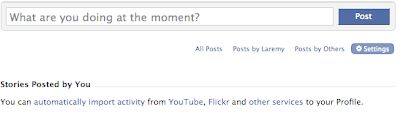
Anyway, the posts are automatically ‘fed’ in from my blog, because Facebook allows you to feed your blog posts, among other services, into your profile. How to configure this:

When at your Profile Page, click on the ‘Settings’ Tab just under your ‘What are you doing at the moment?’ input field. Follow the instructions after that.
Recent Comments